
If you use Easypaisa for sending money, receiving payments, paying bills, or managing everyday digital transactions, reaching an account limit can be frustrating. This is why many Pakistani users search for How to Increase Easypaisa Limit when a transaction is declined or the app indicates that a particular limit has been reached.
The important thing to understand is that an account does not necessarily have one universal limit. Different activities can have different restrictions, and the applicable limits can depend on the account type, verification status, transaction category, and current regulatory requirements.
If you are researching How to Increase Easypaisa Limit in 2026, the safest approach is to start with your account status inside the official app. If additional verification or an upgrade is available, follow the instructions provided by the service rather than relying on unofficial agents or websites.
Why Your Easypaisa Account Has a Transaction Limit
Before looking at How to Increase Easypaisa Limit, it helps to understand why limits exist.
A digital wallet is not necessarily allowed to process unlimited transactions. Restrictions can apply to activities such as sending money, receiving funds, withdrawals, balance levels, bill payments, and other transactions.
Your account may show a restriction because:
- You have reached an applicable transaction limit.
- Your account needs additional verification.
- Your account information needs updating.
- A particular transaction has its own limit.
- A temporary security or compliance check is affecting the transaction.
- Your account type has different limits from another account type.
The specific limit shown in your account should take priority over information found in old articles because financial-service procedures can change.
How to Increase Easypaisa Limit Through Verification
For many customers, How to Increase Easypaisa Limit begins with checking whether additional account verification is available.
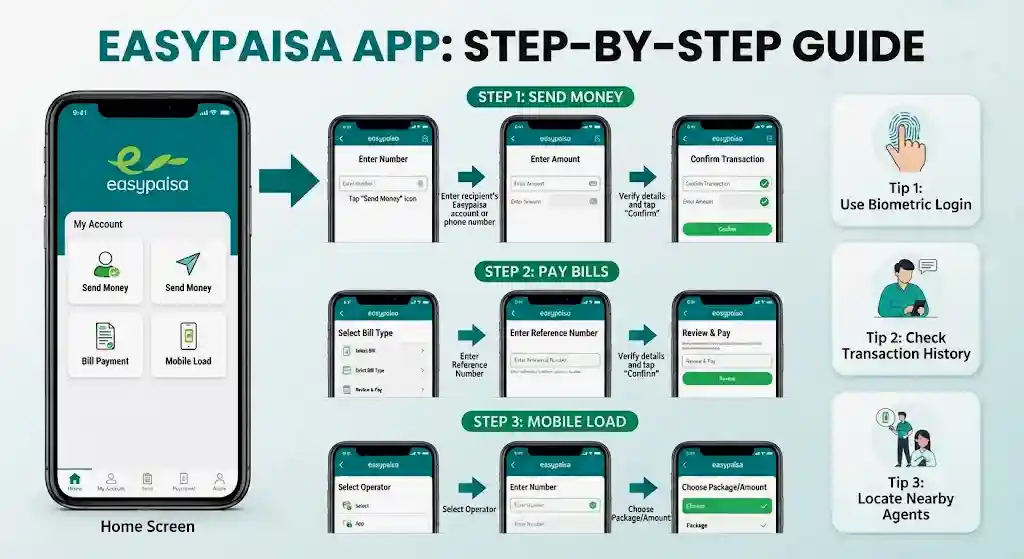
Open the official Easypaisa app and sign in. Depending on the current app interface, look through your profile, account, verification, or upgrade section.
If the app provides an upgrade option, follow the instructions shown on your screen. You may be asked to confirm personal information or complete an identity-verification process.
Do not assume that every account will have exactly the same upgrade options. Eligibility and requirements can differ.
Most importantly, do not give your MPIN, OTP, or complete account access to someone who claims they can increase your limit manually.
How Biometric Verification Can Affect Your Account
When researching How to Increase Easypaisa Limit, you may come across biometric verification.
Identity verification is an important part of financial-account management. If Easypaisa asks you to complete biometric verification, use the official instructions provided by the service.
Depending on the account and verification route, you may need your valid CNIC and registered mobile number. If you are directed to an authorised verification point, take the required original identification document with you.
Do not use unofficial software or modified APK files that claim to bypass verification.
A legitimate account upgrade should take place through the financial service’s recognised channels.
Documents and Information You May Need
Before starting How to Increase Easypaisa Limit, make sure your account information is accurate.
Depending on the verification process available to you, you may need:
- Valid CNIC
- Registered mobile number
- Access to your account
- Correct personal information
- Identity verification
- Biometric verification where required
- Additional information requested by the service
The exact requirements can vary, so users should follow the instructions displayed for their own account.
If your personal information is outdated or inconsistent, completing an upgrade may take longer or require additional verification.
How to Increase Easypaisa Limit for Sending Money
If your problem occurs when transferring money to another person, first determine whether you have actually reached the applicable sending limit.
Open your Easypaisa account and review the information displayed around the failed transaction. If an upgrade or verification option appears, complete that process.
If there is no upgrade option, contact official customer support and explain that your transfer has been restricted.
When contacting support, mention:
- The type of transaction
- The amount you attempted to send
- The error message shown
- Whether the problem happens repeatedly
- Whether your account has already been verified
This gives customer support more useful information than simply saying that your wallet is not working.
How to Increase Easypaisa Limit for Receiving Money
Some users search for How to Increase Easypaisa Limit because they regularly receive money and have reached an applicable account restriction.
Start by checking your account status and the information displayed in the app. If an upgrade is available, follow the official verification process. For More Guide Use 999xa.
If you regularly receive payments for commercial activity, consider whether a business-oriented solution is more appropriate than trying to use a personal wallet for high-volume transactions.
The official Easypaisa corporate portal provides business-focused services including payment collection, bulk disbursement, and corporate accounts.
Do not ask friends or family members to receive money for you simply to bypass a personal account restriction.
How to Increase Easypaisa Limit for Withdrawals
Withdrawal restrictions can be different from sending or receiving limits.
If you are unable to withdraw money, check the message displayed by the app or authorised agent. The issue may be a specific withdrawal restriction rather than a problem with the entire account.
This is another reason that How to Increase Easypaisa Limit should not be treated as a single universal process.
If verification is already complete and the withdrawal still fails, contact official support and ask which restriction currently applies.
Avoid anyone who asks for money in exchange for removing the withdrawal limit.
How to Increase Easypaisa Limit Using the App
If you want to know How to Increase Easypaisa Limit without relying on an outside person, begin with the official application.
A practical process is:
- Open the official app.
- Sign in to your account.
- Open your profile or account settings.
- Look for verification or upgrade information.
- Read the requirements displayed on screen.
- Complete the requested verification.
- Wait for the account status to update.
- Check your transaction capability again.
The names of menus can change after application updates, so an older YouTube video or screenshot may not exactly match your current interface.
What If the Limit Does Not Change?
Completing verification does not necessarily mean that every restriction will disappear.
This is particularly important when searching How to Increase Easypaisa Limit, because some online guides make it sound as though verification automatically creates unlimited transaction access.
That is not a safe assumption.
A verified account can still be subject to applicable restrictions for particular transaction types or account activities.
If the limit remains unchanged:
- Confirm that the verification was completed.
- Close and reopen the app.
- Check your account status.
- Review any notifications.
- Try the transaction again later if the service indicates a temporary issue.
- Contact official customer support if the restriction remains.
Do not repeatedly submit your personal information through different websites.
How to Increase Easypaisa Limit Through Customer Support
If the app does not provide an obvious upgrade option, customer support is the appropriate next step.
When asking How to Increase Easypaisa Limit, be specific about the problem. Instead of saying “increase my account,” explain whether you are unable to send, receive, withdraw, or complete another particular transaction.
The official Easypaisa complaint guidelines currently list a 24/7 helpline at 3737 for Telenor users and (021/042/051) 111-003-737 for other networks. The same guidance also lists in-app support, email, social channels, and an online complaint process.
If you submit a complaint, keep the complaint/reference number for future follow-up.
Can an Agent Increase Your Easypaisa Limit?
Be extremely careful with anyone offering a paid “instant limit upgrade.”
You should not need to give another person:
- Your MPIN
- OTP
- Full account access
- Banking password
- SIM access
- CNIC information through an unofficial channel
A person claiming to be an Easypaisa agent cannot legitimately ask you to surrender control of your wallet simply to increase a limit.
Use recognised support and verification channels instead.
How to Increase Easypaisa Limit Without Risky Shortcuts
There are many websites and social-media posts that advertise quick account upgrades. Some may claim that you can increase your limit through a special APK, software, code, or paid service.
Avoid these methods.
There is no reason to install an unofficial APK simply because somebody claims it can change your financial-account limit. Modified applications can introduce privacy and security risks.
The safest answer to How to Increase Easypaisa Limit is to use the account-management and verification options provided by the service itself.
Easypaisa Limit vs Different Transaction Types
Another common mistake is assuming that one account limit applies to everything.
For example, a user might be able to perform one type of transaction but receive an error when attempting another.
This can happen because financial services may apply different controls to different activities.
Therefore, if you are asking How to Increase Easypaisa Limit, identify the exact activity first:
| Transaction | What to check |
|---|---|
| Sending money | Applicable sending limit |
| Receiving money | Receiving/account balance restriction |
| Cash withdrawal | Applicable withdrawal limit |
| Bill payment | Transaction/payment restriction |
| Account balance | Applicable account-level restriction |
| Business payments | Whether a business solution is more appropriate |
This approach can save time because you are investigating the actual restriction instead of assuming that the whole account needs an upgrade.
Easypaisa Account Security After an Upgrade
Once you have completed the required account verification, protecting the account becomes even more important.
Use a strong MPIN and do not share it with anyone. Treat OTP messages as private security information.
Be careful when receiving calls from people claiming to be support representatives. If you are uncertain, end the call and contact Easypaisa using an official channel.
Also avoid entering your account details into websites reached through suspicious advertisements, unexpected redirects, or social-media messages.
For payment-related information, always check the official service rather than relying on a third-party screenshot.
Easypaisa and Business Transactions
People who frequently receive customer payments may eventually find that a personal wallet is not the right structure for their needs.
The official Easypaisa corporate portal currently describes solutions for businesses, including payment collections, bulk disbursements, corporate current and savings accounts, and online payment gateway services.
Therefore, if your reason for searching How to Increase Easypaisa Limit is related to regular business payments, investigate the appropriate business account or merchant service instead of attempting to bypass personal-account restrictions.
Common Problems During an Account Upgrade
Verification Is Not Completing
Check that the information you submit is accurate and that you are following the instructions shown in the official app.
The App Shows the Same Limit
The verification process may not remove every transaction restriction. Check which specific transaction is being limited.
A Transfer Is Still Declined
Look at the exact error message. The issue may not necessarily be the account limit.
The Upgrade Option Is Missing
Contact official support and ask whether your account is eligible for another account level or verification process.
Someone Offers a Paid Upgrade
Do not provide your credentials or account access. Use official channels.
Frequently Asked Questions
How to Increase Easypaisa Limit in 2026?
Open the official app, check your account and verification status, and follow any upgrade instructions available for your account. If you cannot find an option, contact official customer support.
How to Increase Easypaisa Limit Through Biometric Verification?
If biometric verification is required for your account, follow the official instructions and complete it through an authorised verification process.
How to Increase Easypaisa Limit for Sending Money?
First determine whether you have reached the applicable sending restriction. If an upgrade or verification option is available, complete it through the official app or authorised process.
How to Increase Easypaisa Limit for Receiving Payments?
Check your account status and applicable receiving restrictions. If your activity is commercial or high-volume, investigate whether an appropriate business solution is available.
How to Increase Easypaisa Limit if My Account Is Already Verified?
If your account is verified but a transaction remains restricted, the issue may relate to a specific transaction limit. Contact official support for account-specific information.
How to Increase Easypaisa Limit Without an Agent?
Start with the official app and its account-management options. If additional verification is required, follow the official process instead of using an unofficial agent.
Does an Account Upgrade Remove All Limits?
No. Completing an upgrade or verification process does not necessarily mean that every transaction becomes unlimited. Different account activities can remain subject to applicable restrictions.
Can Someone Increase My Easypaisa Limit for a Fee?
Be cautious of such offers. Do not give your MPIN, OTP, CNIC information, or account access to an unofficial person claiming to provide an instant upgrade.
Final Thoughts on Increasing Your Limit
For anyone searching How to Increase Easypaisa Limit, the safest route is to work through the official account and verification process rather than looking for shortcuts.
Start by checking the account status in the app. Identify whether the restriction affects sending, receiving, withdrawals, balance, or another transaction type. If an upgrade or verification option is available, complete the requested steps.
If you still cannot complete a transaction, contact Easypaisa through its official support channels. The current complaint guidance lists 3737 for Telenor users and (021/042/051) 111-003-737 for other networks, along with in-app and online complaint options.
The key point is simple: How to Increase Easypaisa Limit is an account-management issue, not something that should require a third-party APK, secret code, or paid “agent.” Keep your financial credentials private, use official channels, and verify the specific restriction affecting your transaction before taking further action.